PI-SUPPLYAbout UsAddress in China:Floor 10, Wisdom Building, Donghua Road Middle, Danshui Town, Huiyang district, Huizhou, Guangdong, P.R.C China, Zip code:516211 Address in Italy: Corso Liguria 6 10078 Venaria Reale(TO) ItalyPI-SUPPLY is a professional component supplier, providing everything you need for your component project. We also stock a huge selection of Raspberry pi, Arduino, micro:bit, rock pi and nvidia manufacturer accessories from your favorite brands.
Our goal is to provide you with everything you need for a Raspberry Pi project - whether it's a new Raspberry pi product, a beginner looking for a Raspberry Pi 4 starter kit, or an experienced builder looking for a wide range of components.
Our team works tirelessly to provi
Use Etcher to install Raspberry Pi system to SD card
Use Etcher to install Raspberry Pi system to SD card
author: ft
30/06/2023News
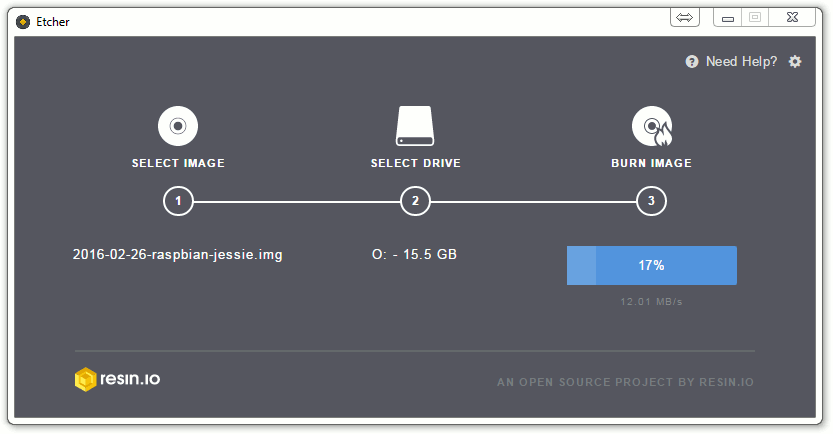
You can use win32diskimager to install the Raspberry Pi system under Windows. The following is Etcher. It not only supports Windows, but also can find corresponding versions under macOS and Linux systems. And the use is more simplified, only three steps are required.
Download the Raspberry Pi system image file, the address is as follows: //shumeipai.nxez.com/download There are many operating system images suitable for Raspberry Pi, choose one that suits you.
After installing Etcher, start Etcher, insert the SD card, select the img file to be installed, and select the disk partition corresponding to the SD card.
We use cookies on our website to see how you interact with it. By accepting, you agree to our use of such cookies. privacy policy
Advanced Cookie Settings
Essential Cookies
These cookies enable core functionality such as security, verification of identity and network management. These cookies can’t be disabled.
Enable Marketing Cookies
These cookies are used to track advertising performance, consent to the sending of advertising-related user data to Google, and consent for the website to serve personalized advertising to provide more relevant services.
Enable Functional Cookies
These cookies collect data to remember choices users make to improve and give a more personalised experience.
Enable Analytics Cookies
These cookies help us to understand how visitors interact with our website, discover errors and provide a better overall analytics.

 Deutsch
 lingua italiana
 日本語
日本語